How I Built a UTM Tool That Got 600+ Visitors in Its First Month
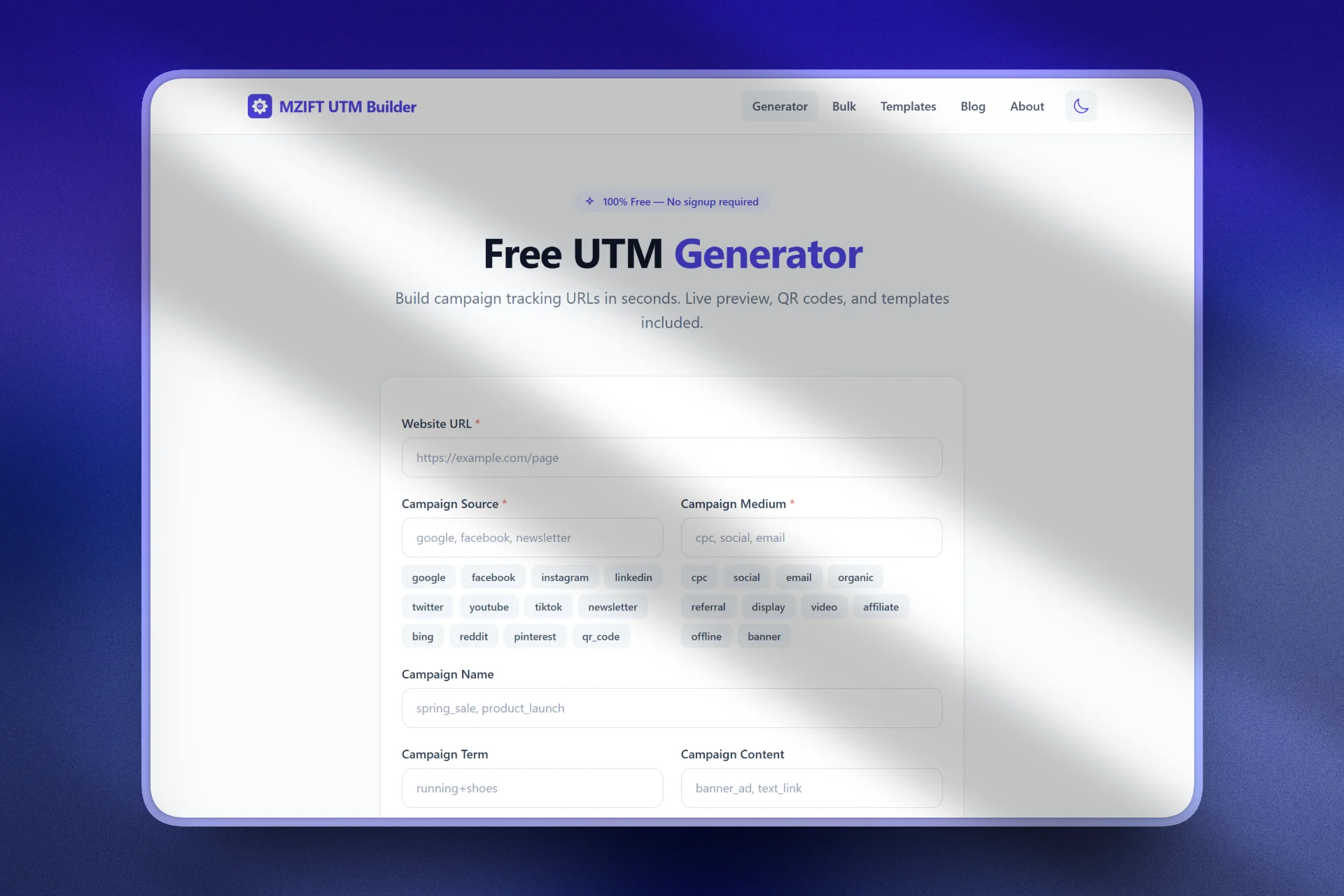
Every marketer needs UTM links, but most UTM builders felt stuck in 2018. Google's own Campaign URL Builder has barely changed in years. The alternatives were either bloated with features nobody asked for, cluttered with ads, or locked basic functionality behind paywalls. I thought I could build something better: something fast, free, and genuinely useful. So I did. This is the story of how I built the MZift UTM Builder and grew it to 600+ visitors in its first month as a solo developer from Pakistan.
The Problem I Wanted to Solve
I was building UTM links for my own projects and kept running into the same frustrations. Google's tool generates one link at a time with no way to save templates, no QR codes, and no bulk option. Other tools required signups, showed intrusive ads, or had confusing interfaces that made a 10-second task take minutes.
I also noticed that marketers managing multiple campaigns across platforms like TikTok, HubSpot, and LinkedIn needed platform-specific UTM setups with the right dynamic macros and naming conventions. That gap became my opportunity.
What I Actually Built
The MZift UTM Builder is not just a basic URL generator. It is a full UTM platform with multiple tools working together. The core generator lets you paste a URL, fill in your UTM parameters with smart suggestions for source and medium values like google, facebook, cpc, social, and email, and see a live preview as you type. One click generates the tagged link, ready to copy.
But I went much further than the basics. I built a Bulk UTM Generator that lets you upload a CSV file with up to 100 URLs and generate UTM links for all of them at once, perfect for large campaigns with multiple landing pages. I added over 30 quick templates for every major platform: Facebook Ads, Instagram Posts, LinkedIn Posts and Ads, Email Campaigns, Google Ads, Twitter/X, YouTube, TikTok Ads, and QR Code/Print. Click any template and it auto-fills the source and medium fields instantly.
The tool generates downloadable SVG QR codes for any UTM link, which is ideal for print materials and presentations. Link history saves your last 20 generated links right in the browser so you can always go back. And if you run the same campaign types repeatedly, you can save your own custom reusable templates.
Platform-Specific Generators
This is where the MZift UTM Builder really differentiates itself. I built dedicated UTM generators for nine major platforms: TikTok, LinkedIn, Facebook, Google Ads, HubSpot, Webflow, Chargify, Tilda, and Keap. Each one comes pre-configured with the correct source and medium values and platform-specific features.
The TikTok UTM Generator, for example, includes support for dynamic macros like __CAMPAIGN_NAME__ and __AID_NAME__ that TikTok Ads Manager auto-populates when someone clicks your ad. The HubSpot generator shows how to capture UTM data on contact records and build reports that connect campaigns to revenue. The LinkedIn generator covers both organic posts and paid ads with the right medium values so traffic does not end up as Unassigned in GA4.
Each platform generator also has a detailed companion guide. The TikTok guide alone covers dynamic macros, Auto-attach setup, manual tagging, GA4 tracking configuration, custom channel groups, and troubleshooting, all with copy-paste templates. These are not thin SEO pages. They are real, in-depth resources that marketers actually use.
The Content Layer
Beyond the tools, I built a full blog on utm.mzift.com with guides, best practices, and platform-specific tutorials. The UTM Parameters Guide explains what each parameter does with real examples. The UTM Best Practices guide covers naming conventions, common mistakes, GA4 setup, and includes an implementation checklist. The What Is a UTM Code article is a beginner-friendly entry point for people just getting started with campaign tracking.
I also wrote integration guides for platforms like Microsoft Dynamics 365, covering auto-tagging, custom fields, and GA4 integration. This content strategy was deliberate: I wanted the blog to answer every question a marketer might have about UTM tracking, so they would discover the tool through the content and keep coming back.
Choosing the Tech Stack
I went with what I know best: PHP for server-side rendering and routing, Tailwind CSS for the interface, and vanilla JavaScript for the interactive bits. No React, no Vue, no build step. This choice was deliberate. I wanted the tool to load fast, work on any device, and be easy for me to maintain as a solo developer.
The core UTM generation, QR code creation, link history, and template system all run client-side. Your URLs and data never leave your browser. Privacy was a design decision, not an afterthought. The entire platform is 100% free with no signup required, no limits on how many links you generate, and no hidden fees.
The Launch and Growth Strategy
I did not do a big launch. No Product Hunt, no paid ads, no viral tweet. Instead, I focused on SEO from day one. Every page on the UTM builder was optimized for specific long-tail keywords that marketers actually search for. Terms like "TikTok UTM parameters," "UTM best practices 2026," "HubSpot UTM tracking," and "free UTM builder with QR code" became my targets.
I cross-promoted the tool from my main site mzift.com and linked it from my other projects. The strategy was simple: build something genuinely useful, surround it with helpful content, make it findable, and let the tool sell itself.
What Worked and What Did Not
What worked was content depth. The blog posts and platform guides drove the majority of organic traffic. People searching for "how to set up UTM parameters for TikTok" or "UTM tracking in HubSpot" landed on my guides and then discovered the tool. The content-to-tool pipeline was the most effective growth channel by far.
What also worked was keeping the tool genuinely free with no signup wall. Users could generate their first UTM link in under 10 seconds. That low friction meant people actually used it, saved templates, and came back.
What did not work was expecting social media posts to drive traffic. I posted about the tool on X and LinkedIn, but the organic reach was minimal. For a solo developer without a large following, SEO content outperformed social posts by a wide margin.
The Numbers After 30 Days
Within the first month, the MZift UTM Builder attracted over 600 unique visitors. The majority came from organic search, with a smaller portion from referrals and direct traffic. The platform-specific generators, particularly the TikTok UTM generator, attracted the most search traffic because fewer competitors covered that niche well. The blog content had strong average session duration, suggesting people were actually reading the guides rather than bouncing.
These are not massive numbers by startup standards, but for a free tool built by one person with zero marketing budget, they validated the approach. The tool was solving a real problem for real people.
Lessons for Indie Makers
First, build more than a tool. Build a platform. The UTM generator alone would have been one of dozens. The bulk generator, 30+ templates, platform-specific generators, QR codes, and in-depth blog content together created something far more valuable than any single feature.
Second, invest in content early and make it genuinely useful. Real guides with real examples, not thin SEO filler. Third, keep your stack simple. PHP and vanilla JavaScript got me to launch faster and kept maintenance minimal. Fourth, free and frictionless wins. No signup, no limits, no ads on the tool itself. Let the product build trust.
If you have not tried it yet, give it a spin at utm.mzift.com. No signup required, free forever.